
Firmware Compatibility in Pyramid G2 Products
Match G2 firmware to A60 or A61 processor boards before upload. Covers PTCDiagnosticG2 serial checks and February 2022 version families.
G2 Products
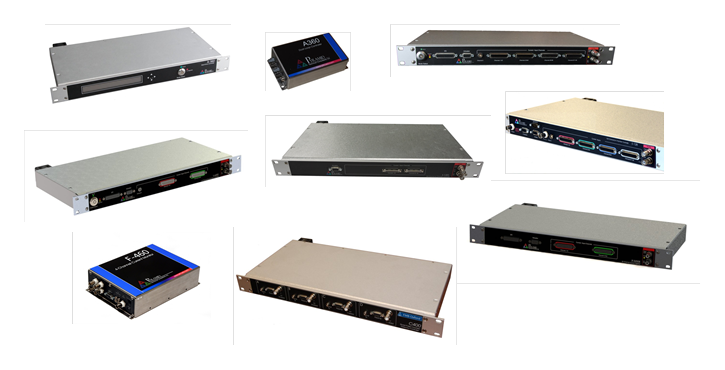
Pyramid G2 electronics run a NIOS II processor in an FPGA on a mezzanine board. The family includes:
- A560 ten-port loop controller / real-time controller
- A360 dual-port loop controller
- I128 128+1 channel electrometer / real-time controller
- I128r5 128+1 channel electrometer / real-time controller
- I128S 64-channel electrometer
- I6400 64+1 channel charge electrometer
- F3200E fast 32-channel current electrometer
- F460 fast 4-channel current electrometer
- C400 four-channel pulse counting detector controller
Related configuration tooling: G2 Diagnostic (PTCDiagnosticG2). See also Linux Distributions of PTCDiagnosticG2 and Installing PTCDiagnosticG2 on Ubuntu Linux.
A60 and A61 Processor Boards
There are two processor board revisions, A60 and A61. The A61 has extra memory and is used where the product needs it.
Firmware must match the processor board type. Loading and starting incompatible firmware leaves the device non-functional. If you realize mid-upload that you have the wrong build, do not reboot. Repeat the upload with compatible firmware. If the unit is rebooted on incompatible firmware and will not run correctly, return it to Pyramid or a qualified agent for recovery.
Checking the Processor Board Type
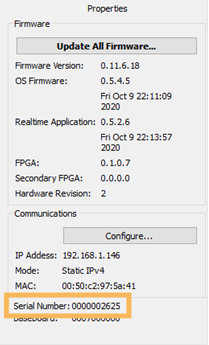
The simplest check is to contact us with the processor board serial number. That number appears on the Properties tab in PTCDiagnosticG2. Pyramid can confirm whether the board is an A60 or A61 from the company database. You can also compare the installed firmware version against the compatibility table below.
The A60 and A61 boards look similar. If you still need a visual check, inspect the FPGA after removing the top cover of a 19" rack product or the outer case of a non-rack unit - only in a clean ESD-safe workspace. The A60 or A61 board carries the Ethernet connector and sits next to the rear panel aperture for the RJ-45 jack.
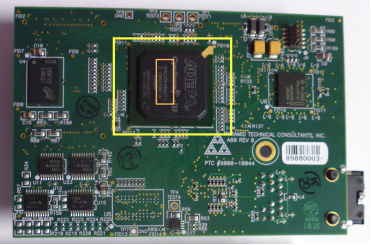
| Board | FPGA |
|---|---|
| A60 | Altera Cyclone 3 EP3C55 |
| A61 | Altera Cyclone 3 EP3C80 |
Firmware Compatibility
The table below records recommended builds as of February 2022. Treat these as the A60/A61 pairing rules and version-family guidance from that note. For the newest package for your serial number, use the downloads on Software / G2 Diagnostic, or contact us.
| Product | If fitted with A60 | If fitted with A61 |
|---|---|---|
| A360 | Current version 0.11.6.19 | Current version 0.12.6.19 |
| A560 | Versions x.10.xxx.xxx (0.10.128.40 and onward); then-current 0.10.133.44 |
Versions x.13.xxx.xxx (0.13.139.149 and onward); then-current 0.13.142.112 |
| I128 | Versions x.11.xxx.xxx (0.11.137.25 and onward); then-current 0.11.142.30 |
Versions x.15.xxx.xxx (0.15.314.279 and onward); then-current 0.15.317.243 |
| I128r5 | As I128 | As I128 |
| I128S | As I128 | As I128 |
| I6400 | Current version 0.7.3.33 | Not applicable |
| F3200E | Current version 0.7.39.20 | Not applicable |
| F460 | Current version 0.11.6.18; special fiber loop slave model 0.8.4.43 | Not applicable |
| C400 | Current version 0.12.6.96 | Not applicable |
Further Information
Browse related notes under Software, or reach Support / contact us before loading firmware if the board type is unclear.